
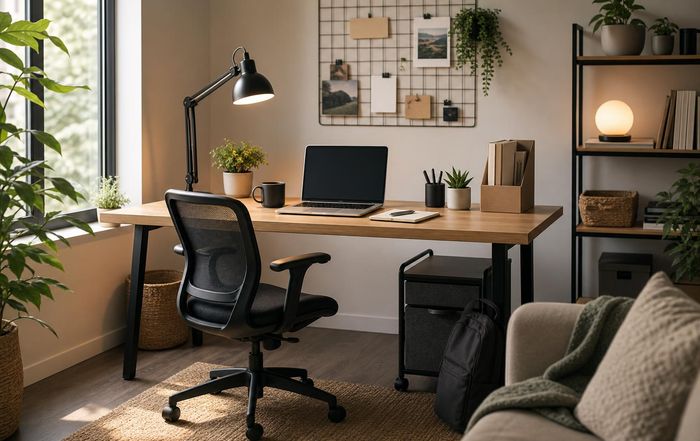
How to Build a Productive Home Office on Any Budget
Designing a productive home office is no longer a luxury reserved for executives and entrepreneurs; it has become a foundational element of modern work and life. As remote and hybrid arrangements continue to mature, workers across the world are discovering that the quality of their workspace directly influences their income, creativity, mental health, and long-term career growth. For the digital nomad community here, which includes freelancers, remote employees, founders, and side-hustlers, the home office is often the primary stage where value is created and delivered.
A productive home office does not require expensive furniture or designer décor. It requires thoughtful choices about space, ergonomics, tools, and habits, aligned with one's budget and work style. From a kitchen table in a small apartment to a dedicated studio in a suburban home, it is possible to create a focused, healthy, and inspiring environment at almost any price point, provided decisions are grounded in evidence and practical experience rather than marketing hype.
This article explores how to design such a space, drawing on research from organizations such as Harvard Business Review, World Health Organization, Mayo Clinic, Chartered Institute of Ergonomics and Human Factors, and others, while also reflecting the practical realities that freelancers and remote workers share every day on platforms like CreateWork.
Why the Home Office Matters More Than Ever
Studies from organizations such as Gallup and Pew Research Center indicate that remote and hybrid work have stabilized as a long-term feature of the global labor market, rather than a temporary response to crisis. Many knowledge workers in the United States, Europe, and Asia now spend at least part of their week working from home, and freelancers often work from home full-time. This shift is not only about location; it alters how people organize their time, manage their energy, and interact with colleagues and clients.
Research from Stanford University has found that well-structured remote work can increase productivity, reduce turnover, and improve work-life balance, but only when workers have access to a quiet, ergonomic, and well-equipped space. When people are forced to work from couches or beds, or in noisy and cluttered environments, the benefits of remote work quickly erode. Cognitive load increases, posture suffers, and boundaries between professional and personal life blur.
For the CreateWork audience of freelancers and independent professionals, the home office carries an additional weight: it is a core business asset. Just as a retail store invests in its layout and lighting, or a factory invests in its machinery, the remote worker must invest in a space that supports deep focus, reliable communication, and consistent output. A thoughtful setup can directly influence billable hours, client satisfaction, and the ability to scale a solo practice into a small business, as explored in resources on building a business from home and freelancing as a career path.
Defining Productivity for a Home Office
Before choosing furniture or technology, it is useful to define what "productive" means for a home office. Productivity is not simply working more hours or responding to messages faster. For remote workers and freelancers, it typically involves a blend of factors: sustained concentration, high-quality output, reliable communication, and sustainable energy levels.
Research from MIT Sloan Management Review and McKinsey & Company suggests that knowledge worker productivity is strongly linked to minimizing context switching, protecting uninterrupted blocks of time, and reducing friction in routine tasks. This implies that a productive home office should be designed to support:
A clear separation between work and leisure, even if only through visual cues or portable setups.
An ergonomic posture that minimizes pain and fatigue, enabling deep work for longer periods.
Reliable technology and connectivity, so that tools do not become bottlenecks.
A system for managing documents, ideas, and tasks, reducing cognitive clutter.
A sense of psychological safety and calm, which supports creativity and problem-solving.
The CreateWork ecosystem emphasizes this holistic view of productivity, connecting space design with productivity tools, remote work best practices, and broader guidance on sustainable career development.
Budget-First Planning: Clarifying Constraints and Priorities
Every home office is built within constraints: space, budget, family responsibilities, and local housing conditions. A realistic plan begins with an honest assessment of these constraints rather than an idealized image from social media.
For workers with very limited budgets, the priority is to achieve ergonomic safety and basic privacy using low-cost or second-hand solutions. For those with moderate budgets, it becomes possible to invest in a dedicated desk, better lighting, and a few carefully chosen productivity tools. Higher budgets allow for adjustable sit-stand desks, acoustic treatments, and more advanced technology, but even then, the goal is not to accumulate equipment; it is to reduce friction and protect health.
Organizations such as Consumer Reports and Wirecutter have repeatedly shown that mid-range or refurbished equipment often offers the best value for money, with diminishing returns at the highest price points. For example, a mid-priced office chair with adjustable lumbar support and armrests can provide health benefits comparable to premium models, provided it fits the user's body and is adjusted properly. Similarly, an affordable external monitor can dramatically improve posture and visual comfort compared to working solely on a laptop screen.
On CreateWork, many freelancers and entrepreneurs share strategies for stretching limited funds, such as using local second-hand marketplaces, repurposing existing furniture, and prioritizing investments that directly protect health and income, while postponing purely aesthetic upgrades. This practical, staged approach to spending aligns with broader guidance on managing money as an independent worker and building financial resilience.
Ergonomics on Any Budget: Protecting Health and Focus
Ergonomics is the foundation of a productive home office, because discomfort and pain slowly erode concentration and can lead to costly health problems over time. Organizations such as the World Health Organization (WHO), Mayo Clinic, and Chartered Institute of Ergonomics and Human Factors emphasize a few core principles that can be implemented at almost any budget:
The screen should be at or slightly below eye level, at arm's length, to reduce neck strain and eye fatigue.
The keyboard and mouse should allow forearms to remain roughly parallel to the floor, with wrists neutral.
Feet should be flat on the floor or on a footrest, with knees and hips at roughly 90 degrees.
The chair should support the natural curve of the lower back and allow adjustments to height and backrest angle.
For those with minimal budgets, these principles can be met creatively. A stack of sturdy books or a laptop stand can raise the screen. A cushion or folded towel can provide lumbar support. A box or low stool can serve as a footrest. What matters is alignment, not the brand name on the equipment.
At moderate budgets, investing in an adjustable office chair and a separate keyboard and mouse often yields the greatest improvement. Studies summarized by Occupational and Environmental Medicine suggest that appropriate seating and workstation adjustments can significantly reduce musculoskeletal complaints among computer users. An external monitor further improves posture by allowing the screen to be placed at the correct height and distance.
Higher-budget setups can benefit from sit-stand desks, which allow workers to alternate between sitting and standing, reducing prolonged static postures. Research from Harvard T.H. Chan School of Public Health and other institutions indicates that alternating positions and taking regular micro-breaks can reduce discomfort and may improve subjective energy levels, though standing all day is not recommended either. The most effective approach is dynamic: moving between positions, stretching, and occasionally stepping away from the desk.
CreateWork encourages remote workers to treat ergonomics as a core element of professional development, similar to upskilling or financial planning, because unmanaged pain can lead to reduced billable hours, missed deadlines, and long-term health costs. Readers exploring upskilling and self-development often combine ergonomic improvements with learning new tools and methods to sustain performance over many years.
Space, Zoning, and Boundaries in Different Living Situations
Not everyone has a spare room to convert into a home office, especially in dense urban environments in Europe, Asia, and North America. Yet even in small apartments or shared homes, it is possible to create psychological and functional boundaries that support focused work.
Research published in Journal of Environmental Psychology and reports from American Psychological Association (APA) highlight that visual cues and routines can strongly influence how the brain interprets spaces. When a particular corner, table, or arrangement of objects is consistently associated with work, it can trigger a mental shift into "focus mode," even if the space is physically shared or temporary.
Workers in small spaces often benefit from portable or modular setups: a folding desk, a wheeled cart with work supplies, or a laptop plus compact external keyboard and mouse that can be quickly deployed and stored. A simple ritual, such as setting up a particular lamp, opening a notebook, or putting on noise-cancelling headphones, can signal the start of the workday. At the end of the day, packing away these items helps reestablish separation between work and leisure, which is critical for mental health and preventing burnout.
For those with dedicated rooms, zoning the space can further enhance productivity. The desk and primary work tools should occupy the quietest, best-lit part of the room, while recreational items are kept out of the immediate visual field to reduce distraction. Studies on attention and clutter, including work summarized by Princeton University Neuroscience Institute, suggest that visual clutter can increase cognitive load and reduce task performance, making regular tidying and organization a practical productivity strategy rather than a purely aesthetic choice.
On CreateWork, many remote professionals describe how deliberately shaping their space-using room dividers, plants, rugs, or even different wall colors-helps maintain boundaries, especially when living with family or roommates. These experiences complement formal research and underscore that a productive home office is as much about psychological design as it is about furniture. Readers interested in broader lifestyle design can explore related ideas in lifestyle and work-life integration.
Lighting, Sound, and the Science of Attention
Lighting and sound are often overlooked in home office design, yet they have a profound impact on alertness, mood, and cognitive performance. Organizations such as Illuminating Engineering Society (IES) and research from University College London and Karolinska Institute highlight that natural light, where available, is ideal for daytime work, as it supports circadian rhythms and can improve well-being. Positioning the desk perpendicular to a window reduces glare while maximizing daylight.
When natural light is limited, a combination of ambient lighting and task lighting is recommended. A desk lamp with adjustable brightness and color temperature can help reduce eye strain. Cooler, brighter light tends to promote alertness during focused work, while warmer light can be used in the evening to support relaxation and better sleep, as discussed by National Sleep Foundation and similar organizations.
Sound is equally important. For some, complete silence is ideal; for others, a consistent background sound such as white noise or soft instrumental music improves concentration. Research from University of Chicago suggests that moderate ambient noise can sometimes enhance creative thinking, but loud or unpredictable noise, such as traffic or household activity, tends to impair performance. Noise-cancelling headphones, soft furnishings that absorb sound, and simple measures like weather-stripping doors or using thick curtains can all contribute to a more acoustically comfortable workspace.
The CreateWork community often combines these environmental adjustments with digital tools, such as focus-enhancing audio apps or browser extensions that limit distracting websites. Readers can explore more about such productivity technologies and tools and how they integrate with physical workspace design to support deep work.
Technology Essentials: Reliable, Not Excessive
For freelancers, remote employees, and online entrepreneurs, technology is the bridge between the home office and the global marketplace. However, productivity rarely depends on having the most expensive hardware; it depends on having reliable, appropriately configured tools that match the work being done.
At a minimum, a productive home office requires a stable internet connection, a computer capable of running necessary applications, and a way to participate in video calls with clear audio and video. Reports from Ofcom in the United Kingdom, Federal Communications Commission (FCC) in the United States, and similar regulators in other regions emphasize the importance of upload speeds for video conferencing and cloud collaboration, not just download speeds. For many knowledge workers, upgrading to a more stable router or using a wired Ethernet connection can significantly improve call quality and reduce frustration.
A basic external webcam and microphone or headset can often outperform built-in laptop components, improving perceived professionalism in client meetings. For those who record content or host webinars, higher-quality microphones and lighting may be justified, but for most remote workers, clear audio and a neutral background are sufficient.
Cloud-based collaboration tools such as Microsoft 365, Google Workspace, Slack, and Zoom have become standard, and many offer free or low-cost tiers suitable for individuals and small teams. Cybersecurity is also a crucial consideration; guidance from organizations like National Cyber Security Centre (NCSC) in the UK and Cybersecurity and Infrastructure Security Agency (CISA) in the US stresses the importance of strong, unique passwords, multi-factor authentication, and regular software updates, particularly for those handling client data or financial information.
For the CreateWork audience, technology decisions are often intertwined with business strategy. A freelance designer, for example, may prioritize a color-accurate monitor and sufficient RAM for creative software, while a consultant might invest more in webcam quality and note-taking tools. Resources on remote work practices and starting a small business can help individuals align their tech stack with their specific professional goals.
AI, Automation, and the Modern Home Office
Automation and artificial intelligence are transforming how work is performed, and the home office is increasingly becoming a hub for these tools. From AI-powered writing assistants to automated bookkeeping, these technologies can reduce repetitive tasks and free up time for higher-value work.
Reports from OECD, World Economic Forum, and Brookings Institution suggest that while AI may automate certain tasks, it is more likely to augment human roles than fully replace them in many knowledge-based professions. For freelancers and remote workers, this means that learning to integrate AI tools into daily workflows can become a competitive advantage. Examples include using AI for drafting emails, transcribing meetings, organizing research, generating first drafts of content, or analyzing data, while still applying human judgment and expertise for final decisions.
The key is to view automation as a way to streamline routine activities rather than as a replacement for skill development. A well-designed home office can support this by ensuring that devices, software, and data flows are organized and secure, with clear backups and version control. CreateWork offers guidance on AI and automation in independent work, emphasizing both the opportunities and the need for continuous learning.
Financial Strategy: Investing Wisely in the Home Office
From a financial perspective, the home office is both a cost center and a productivity asset. For freelancers and business owners, it can also have tax implications, though rules vary significantly by country. Authorities such as Internal Revenue Service (IRS) in the United States, HM Revenue & Customs (HMRC) in the United Kingdom, and their counterparts in Europe, Asia, and other regions provide guidance on when and how home office expenses may be deductible. Because regulations are complex and frequently updated, consulting an accountant or reliable local resources is essential before making assumptions.
A practical approach for most remote workers is to categorize expenses into three tiers. The first tier includes essential items that directly enable work, such as a functional computer, internet service, and a basic ergonomic setup; these are often non-negotiable. The second tier includes enhancements that significantly improve comfort or efficiency, such as a better chair, an external monitor, or improved lighting; these can be added gradually as income allows. The third tier includes aesthetic upgrades and non-essential gadgets; these may be rewarding, but they should not be prioritized over financial stability or core business investments.
By aligning spending with clear priorities and tracking the return on investment in terms of reduced pain, increased billable hours, or improved client satisfaction, remote workers can make more confident decisions. The financial education resources available through CreateWork, including insights on managing money as a freelancer and long-term financial planning, reinforce the importance of viewing the home office as part of a broader economic strategy.
Habits, Routines, and the Human Side of Productivity
Even the most carefully designed home office will not deliver its full potential without supportive habits and routines. Research from University of California, Irvine on interruptions and productivity shows that frequent digital distractions can significantly extend the time required to complete tasks, as workers must repeatedly re-orient themselves. Establishing clear blocks of focused work, using techniques such as timeboxing or the Pomodoro method, can help reclaim attention.
Psychologists and occupational health experts, including those cited by American Psychological Association, emphasize the importance of regular breaks, physical movement, and social connection. Working from home can increase the risk of isolation, which can in turn affect motivation and mental health. Intentional strategies such as virtual coworking sessions, scheduled check-ins with colleagues or clients, and participation in professional communities can mitigate this risk.
The CreateWork platform functions as one such community, where freelancers and remote workers can share experiences, seek advice, and discover new opportunities. By combining a thoughtfully designed home office with supportive routines and a sense of connection to peers, individuals can build careers that are both productive and sustainable.
Building a Home Office That Evolves With Your Career
A productive home office is not a static project; it evolves as work changes. A freelancer who begins with a laptop at a dining table may later expand into a dedicated studio as clients and income grow. A remote employee may shift from individual contributor work to team leadership, requiring better video conferencing tools and more privacy. An entrepreneur might transform a corner of the home into a small operations center as a side project becomes a full-time business.
The most resilient workspaces are those designed with adaptability in mind: modular furniture, portable equipment, and a mindset that treats the office as a living system rather than a fixed installation. By periodically reviewing what is working well and what causes friction, and by staying informed through trusted resources such as CreateWork and external organizations like Harvard Business Review, World Economic Forum, and OECD, remote workers can make incremental improvements without overspending.
Ultimately, the goal is to create a space that reflects and supports one's professional identity, whether that is a freelance developer in Berlin, a remote marketer in Toronto, a designer in Singapore, or a consultant in Cape Town. Across regions and industries, the principles remain consistent: align the environment with the body's needs, reduce friction in daily tasks, protect attention, and invest thoughtfully based on clear priorities.
For the often expat remote working community, the home office is more than a physical location; it is the engine of independence, creativity, and opportunity. With intentional design, even modest budgets and small spaces can be transformed into work environments that enable individuals to do their best work, serve clients around the world, and build meaningful, resilient careers in the evolving global economy. Those ready to take the next step can explore additional day to day guidance on remote work strategies, freelance careers, business building, and productivity tools and technology throughout creatework.com.
